
One part of the design process has always felt unnecessarily repetitive to me. We work through an idea in Rhino, get the geometry somewhere interesting, and then rebuild much of it in Revit so it can be documented. The second model might look like the first, but getting there involves another round of decisions, adjustments and checking.
It gets more awkward when the design changes. A small adjustment in Grasshopper can reorganize an entire façade. Making the same adjustment in the documentation model may take considerably more work. Before long, keeping the two versions aligned becomes a task of its own.
That was my starting question for Ribbit: could we carry more of the work across? Geometry, certainly, but also the panel identities, dimensions and parameters that explain what we have designed. I wanted to see whether an early Grasshopper experiment could develop into something useful for documentation without having to start over.
The name came quite naturally: Rhino + Revit = Ribbit. It sounds a little like “Rivvit,” and gave the plugin a frog along the way.
Starting with a façade
I already had some C# work in Grasshopper for panelizing façades, so there was a practical place to begin. A façade gives you plenty to test: repeated parts, different panel types, changing dimensions, fins, materials and patterns. You can start with a simple surface and gradually ask more of it.
I split the first plugin into stages: extract, generate, analyze, design, preview and commit. I wanted a sequence I could keep developing, with components that made sense together, rather than a script that only worked for one particular arrangement.
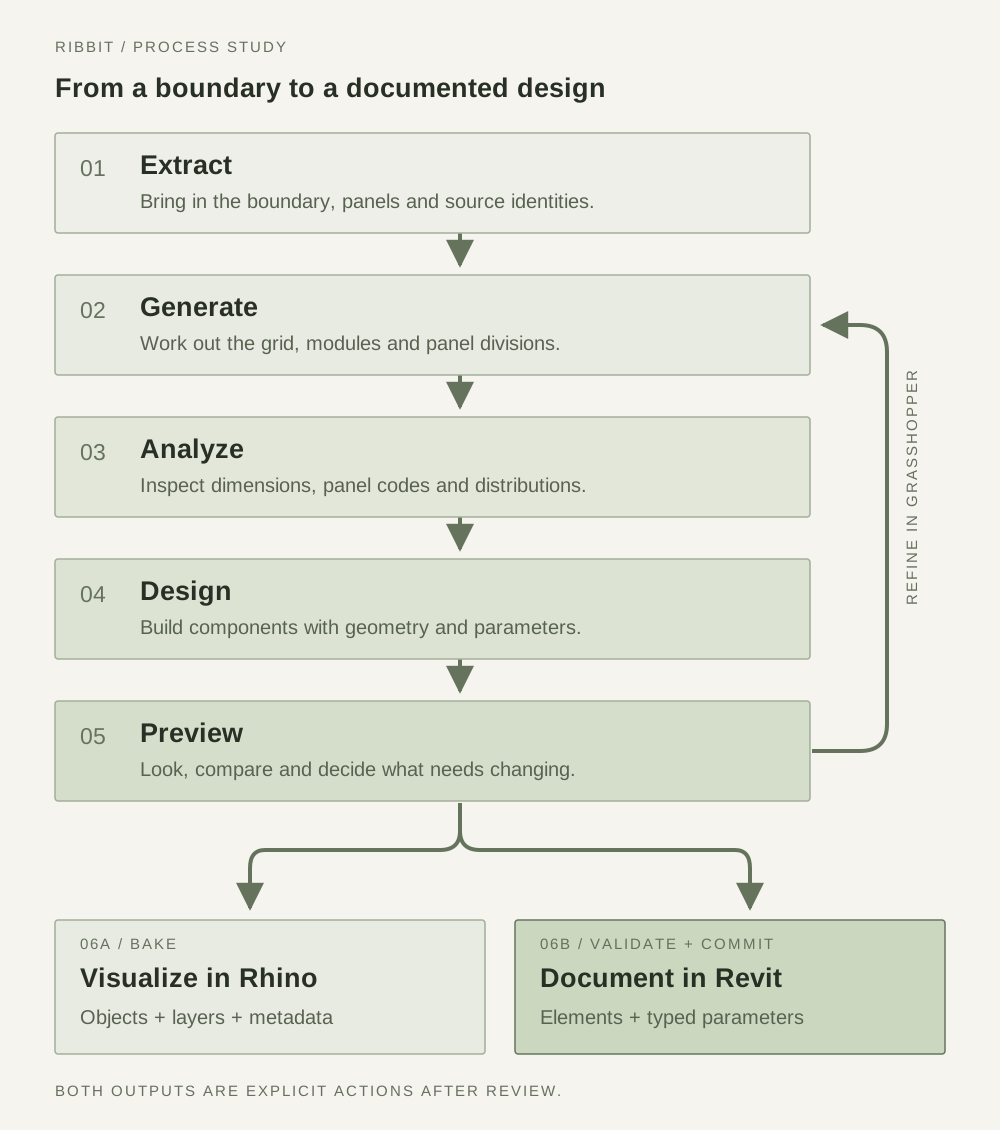
An early clarification was where to start. In the Revit-connected workflow, we could place a curtain wall in Revit first and extract its boundary as a guide surface. Grasshopper would then become the place to work out the façade: its divisions, panel distribution and more detailed geometry. Revit provided the building context; the design controls stayed in Grasshopper.
That arrangement made the experiment more concrete. It also exposed the difference between changing existing panels and creating new ones. Swapping a panel type was relatively straightforward because Revit already knew which element we meant. A freshly generated Grasshopper panel had no such identity. We had to establish the grid and match the new design to the cells Revit produced before we could do anything useful with it.
Keeping the design together
This is where the information travelling with each shape started to matter. A panel needed to carry its code, position and source, as well as its shape. Otherwise, how would the next component know what it was receiving? And how would a later update find the right element again?
I kept the source panel separate from the design applied to it. The same cell could become an offset panel, a set of fins or a more freely shaped piece. Keeping its identity made it possible to explore those alternatives without losing track of where they belonged.
Some of this was useful internally but awkward on the canvas. At one point, I questioned why I had to connect both a panel and its design when the design already contained the panel information. I also asked to rename “Panel Definition” to “Panel Design.” Small things, but they matter when you are trying to follow a definition and understand what each wire is carrying.
The same principle applied to identifiers. Row and column numbers were helpful until another wall had the same numbers. Including the source wall in the identity gave the committed elements a clearer connection back to their origins. These are the less visible parts of a workflow, but they become very visible when an update targets the wrong thing.
Bake it, or commit it
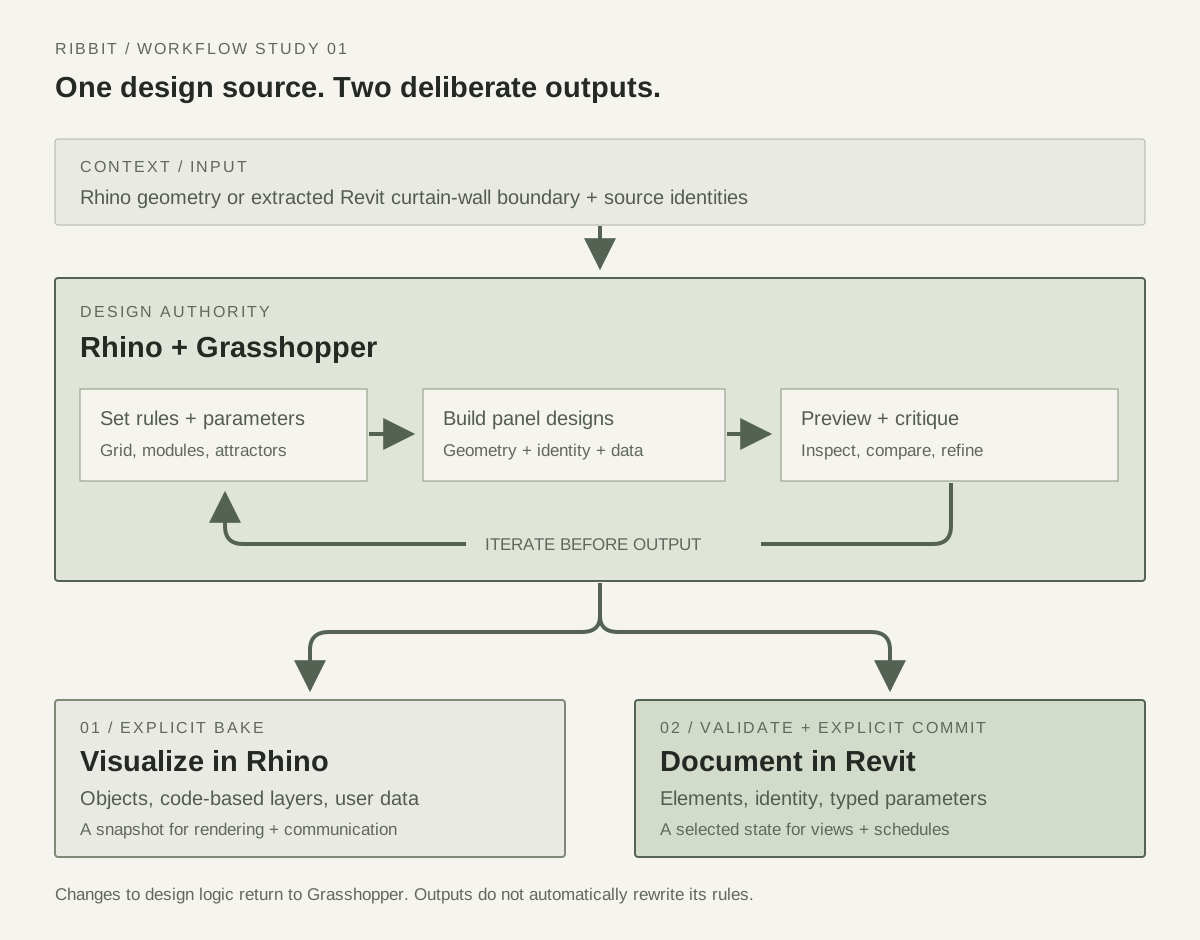
I wanted two clear ways out of the design process. Sometimes the next step is simply to see an option properly, render it or put it in front of someone for discussion. Other times, it is ready to enter the documentation model.
The bake path creates Rhino objects, using panel codes to organize them into layers. It gives us a usable snapshot outside the live Grasshopper definition. The commit path carries the selected design into Revit, along with the information needed to identify and schedule it.
Neither should happen just because a slider moved. While designing, I want to adjust something, see what happens and change my mind. A preview can stay temporary for as long as it is useful. Pressing Commit is a separate decision to bring that particular result into the Revit model.
It also makes it easier to know where to make a change. If the design needs to change, we return to Grasshopper. A baked object or a committed element is an output of that process; editing it does not automatically update the original rules. That is a limitation, but it is also a boundary I can work with.
From flat panels to more possibilities
Once panelization and type swapping were working, I wanted to try designs that did more than select an existing Revit type. Offset panels were a starting point. Fins added more interesting questions: could their spacing be uneven? Could each one rotate? Could they run horizontally or vertically, with glazing behind them or nothing behind them at all?
Those questions became inputs to the Grasshopper components. They also revealed how much the Revit family setup affected what could be transferred. A shape that rotated freely in Rhino could meet a placement constraint in Revit. Reproducing the appearance meant understanding how the receiving component actually behaved.
Eventually I asked whether every new design would need a new family. FlexPanel was an attempt to open things up, allowing more general geometry, including cutouts and three-dimensional forms, to enter the workflow.
There is a trade-off here. A native Revit family can have its own editable behavior. FlexPanel can carry evaluated geometry as DirectShapes, but it does not turn a Grasshopper definition into a fully parametric Revit family. For this experiment, that was acceptable. I wanted to keep designing upstream while making the result useful downstream.
More than something that looks right
I did want the parameters to be visible in Revit. If a panel had a particular rotation, width or area, that information should be available in a schedule. It did not need to become another control for changing the geometry in Revit.
Even that required some care. A rotation entered as a whole number and another entered as a decimal could be interpreted as different data types. Explicitly describing both as angles removed the ambiguity. Having a field was only useful if the next component understood what the value meant.
The geometry had its own surprises. Some fin arrangements looked correct in Rhino but shifted or overlapped after being committed. In one case, the family resized in a way that moved its center, so the placement had to be checked again after regeneration.
Other tests produced a different number of Revit cells from the number of panels we intended. I kept asking for better logging because “it failed” was not enough to work with. We needed to see which grids were being changed, what Revit had generated and where the matching broke down. Several fixes needed further testing before the next problem became clear.
These tests have made me pay more attention to what happens after a shape leaves Grasshopper. Seeing the right shape in one viewport is a useful first step. Seeing it arrive correctly, with the right information, and then survive another revision is a much better test.
Where this leaves the experiment
Ribbit is still focused on façade workflows, mainly planar vertical curtain walls, including tests with irregular outer profiles. There is more to explore before extending the same approach to other conditions or components.
I would also hesitate to put a time-saving number on it yet. I would want to follow it through several revisions first. How much do we still have to rebuild? What information survives? Can someone else pick it up without untangling the whole definition?
There is a team question still to work through, too. If Grasshopper holds the design logic, how does someone working on documentation request a change? How do they know which version they are looking at? Passing metadata helps, but it does not answer all of that.
For now, the direction feels worth pursuing. I want the early tests to remain useful as the design becomes more detailed. A simple panel study can grow into components, those components can carry data, and the chosen result can move into visualization or documentation. There will still be translation between tools. Hopefully, there can be less starting again.