
A generated layout is useful while we are exploring it. The next question is what happens when we want to take it further. If we have to redraw the boundary to get started, then redraw the rooms again in Revit afterwards, a lot of the work simply moves from one place to another.
The recent PLANNR work has been about reducing that repetition. I want to bring a more accurate outline from Revit into the canvas, try department arrangements inside it and take a chosen layout back in a form that suits the next stage of work. It is a practical connection to the question behind RIBBIT too: how much of a design can we carry forward instead of making it again?
Start with the boundary we already have
A quickly drawn shape is fine for an early test. Once a building footprint or department boundary exists in Revit, I would rather use that geometry. Small notches, offsets and changes in proportion can make a real difference to how rooms and corridors fit. Tracing an approximation introduces another thing to check before we have even started planning.
The new route begins with selected filled regions in a Revit plan. A Dynamo Player tool exports their boundaries to a DXF, which PLANNR imports as separate outlines. We can then classify an outline, connect access nodes and use it for generation. We are carrying selected geometry across; PLANNR isn't opening the Revit model itself.
Keeping the placement straight has been as important as getting the shape across. Revit and a browser canvas don't describe the vertical direction on screen in the same way. A boundary can arrive at the right size and still be reflected. An asymmetric notch makes that kind of mistake much easier to see than a rectangle does.
The import work now accounts for that difference and records the placement information needed for the return journey. Units, coordinates and elevation still need to agree. If an older outline doesn't have that information, the export needs a fresh import or checked offsets. I'd rather make that visible than let the tool guess and produce a convincing plan in the wrong place.
Choose what needs to go back
Once a department layout has been committed, its export menu offers three routes. I like having that choice because a planning discussion and a developing documentation model don't need the same kind of output.
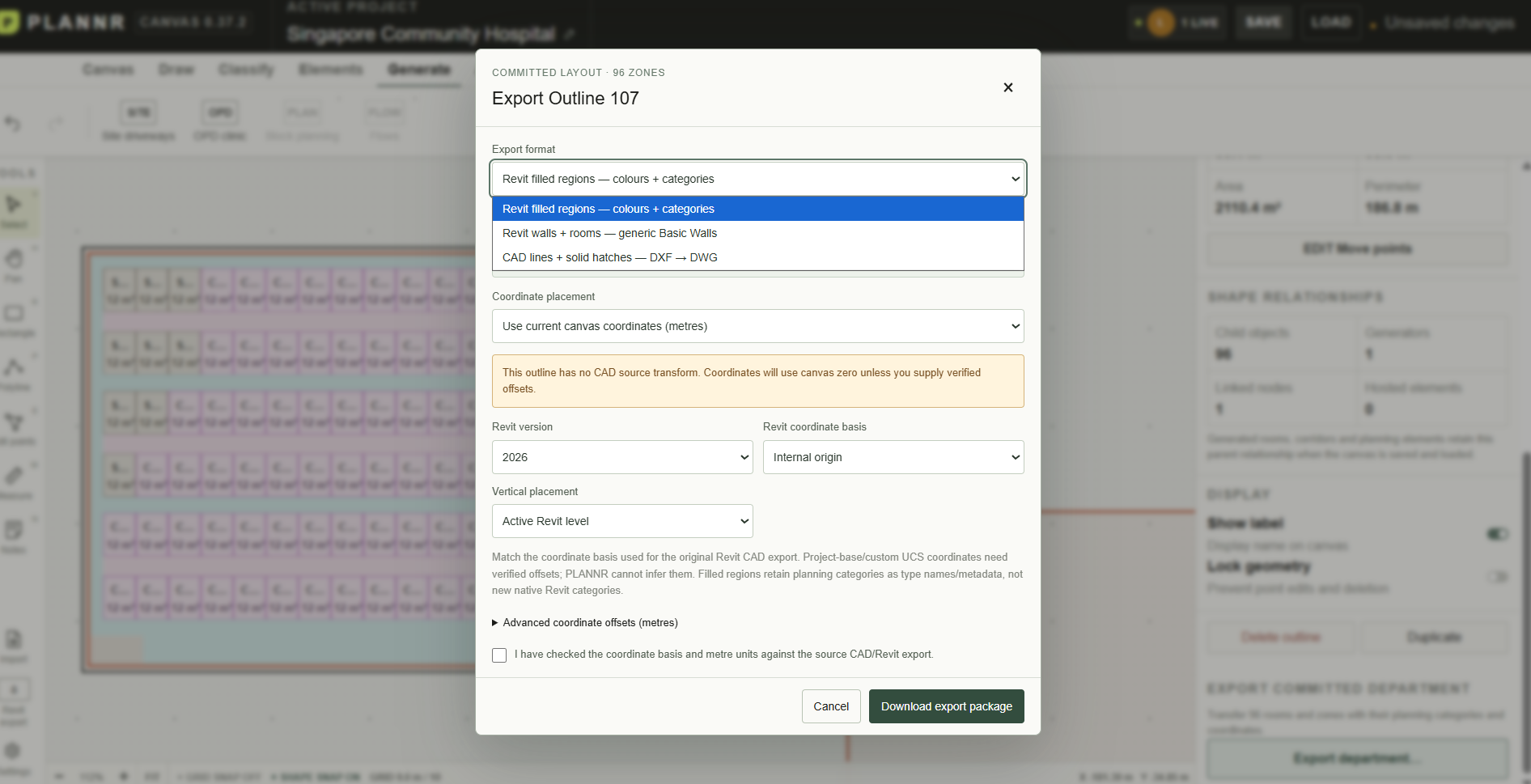
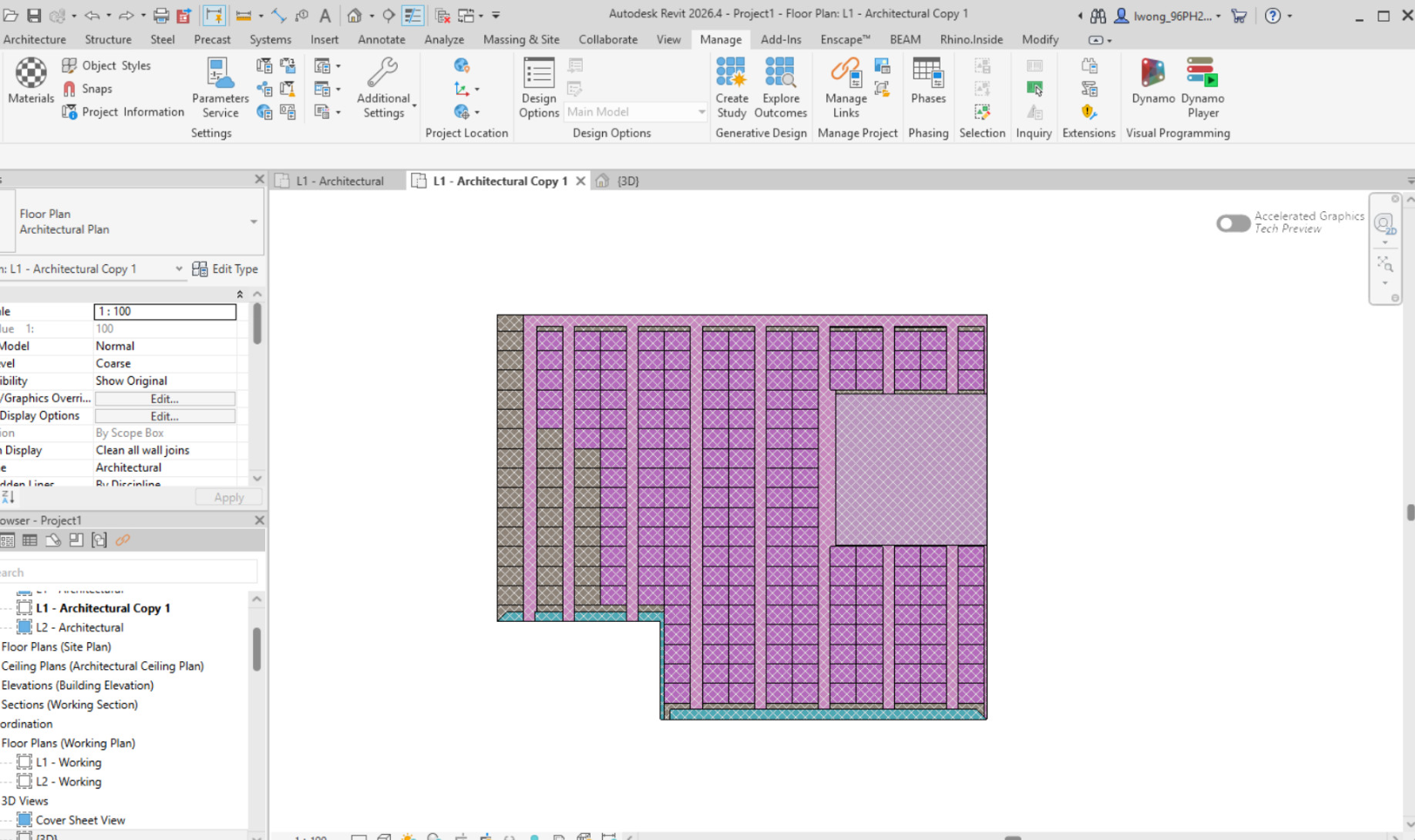
Filled regions are useful when the next conversation is still about planning. They carry the zones back into a Revit view with colours and category information. Consultation rooms, support space and circulation can remain readable as parts of an arrangement, without immediately turning every edge into a wall.
Walls and rooms take the layout a step further. This route uses generic Basic Walls and room information so the generated arrangement can become a starting point inside the model. The 3D view makes the difference clear: the rows and corridors now have physical boundaries that can be inspected in Revit.
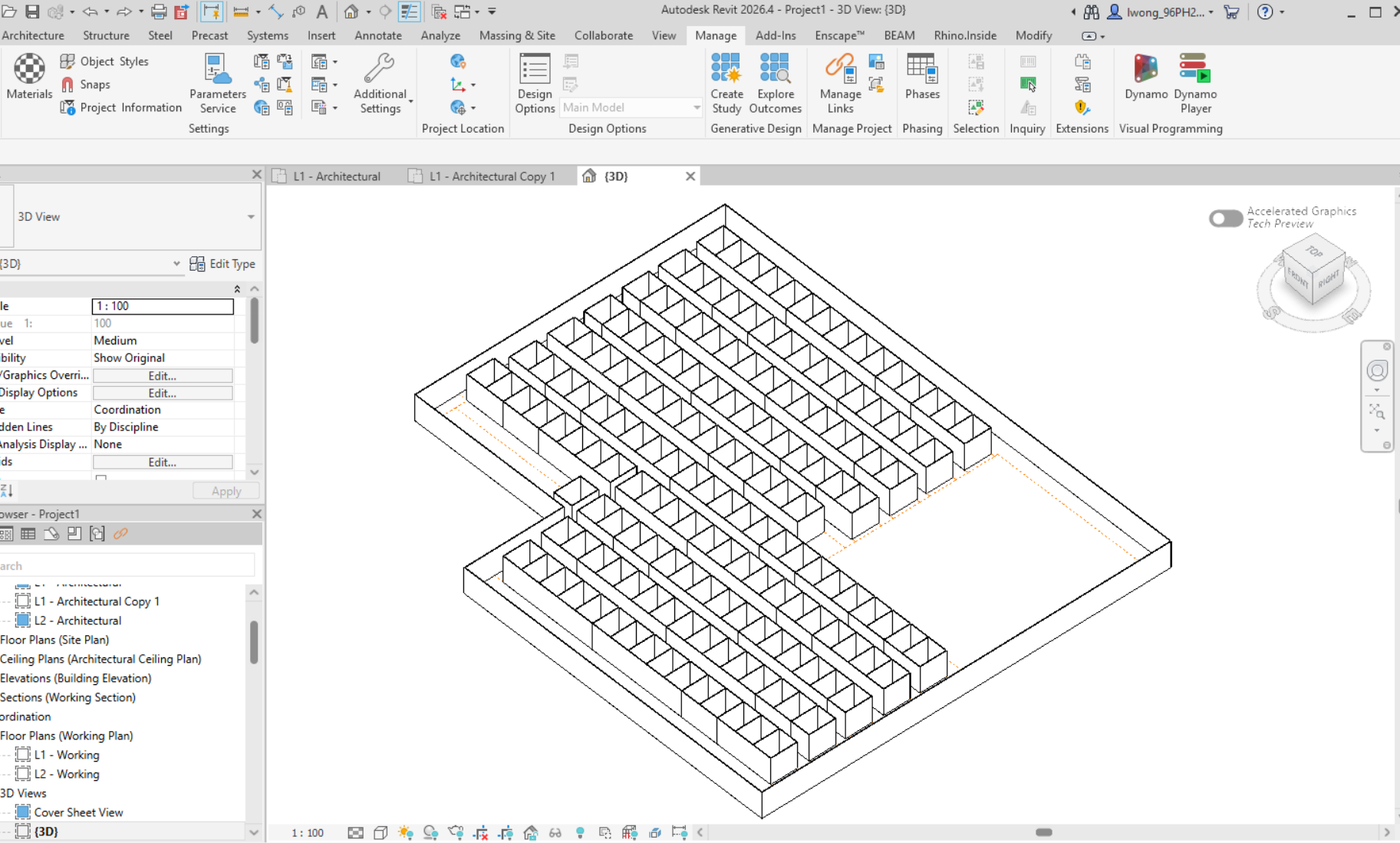
That doesn't make them finished architecture. Wall thickness changes the space inside a room, and a generated plan still needs checking against the actual project. Doors, construction decisions and the other details that make a department work remain part of the design process. What I want to avoid is having to reconstruct the whole arrangement before that work can begin.
The third route is CAD lines and solid hatches. PLANNR produces DXF, with a local conversion route to DWG using installed AutoCAD. It gives us another way to pass the arrangement on when a CAD drawing is the useful handover. It is worth being clear that the browser isn't producing a native DWG by itself.
For the Revit routes, the download contains the layout data and a Dynamo Player graph. The transfer is a deliberate import step. It isn't a live link where every change on the canvas immediately updates the model. I want room to test and compare options before deciding which one belongs in Revit.
Keep checking the journey, not just the result
The screenshots show the generated department as a coloured plan and as walls in Revit. That is useful progress, but one successful arrangement doesn't tell us how every boundary or project will behave. Irregular corners, narrow spaces, different coordinate setups and subsequent revisions are all part of the test.
There is a distinction between transferring a picture and transferring useful planning information. The export needs to retain which zones are consultation, waiting or support, as well as where their edges lie. For filled regions, that information travels through type names and metadata; it doesn't create new native Revit categories.
I also don't want to suggest that everything visible on the canvas is already included. Furniture is not yet part of this CAD/Revit exchange. The useful question for each output is what the next person can actually work with, and what still needs to be added or checked.
The workflow I am aiming for is straightforward: take the boundary from the model, explore alternatives on the canvas, review a committed option and bring the appropriate output back. If the design changes, we should be able to repeat that process with a clear understanding of what has changed. Automatic reconciliation of every later edit is a much bigger problem, and this file-based exchange doesn't solve it yet.
Leave the next person something to work with
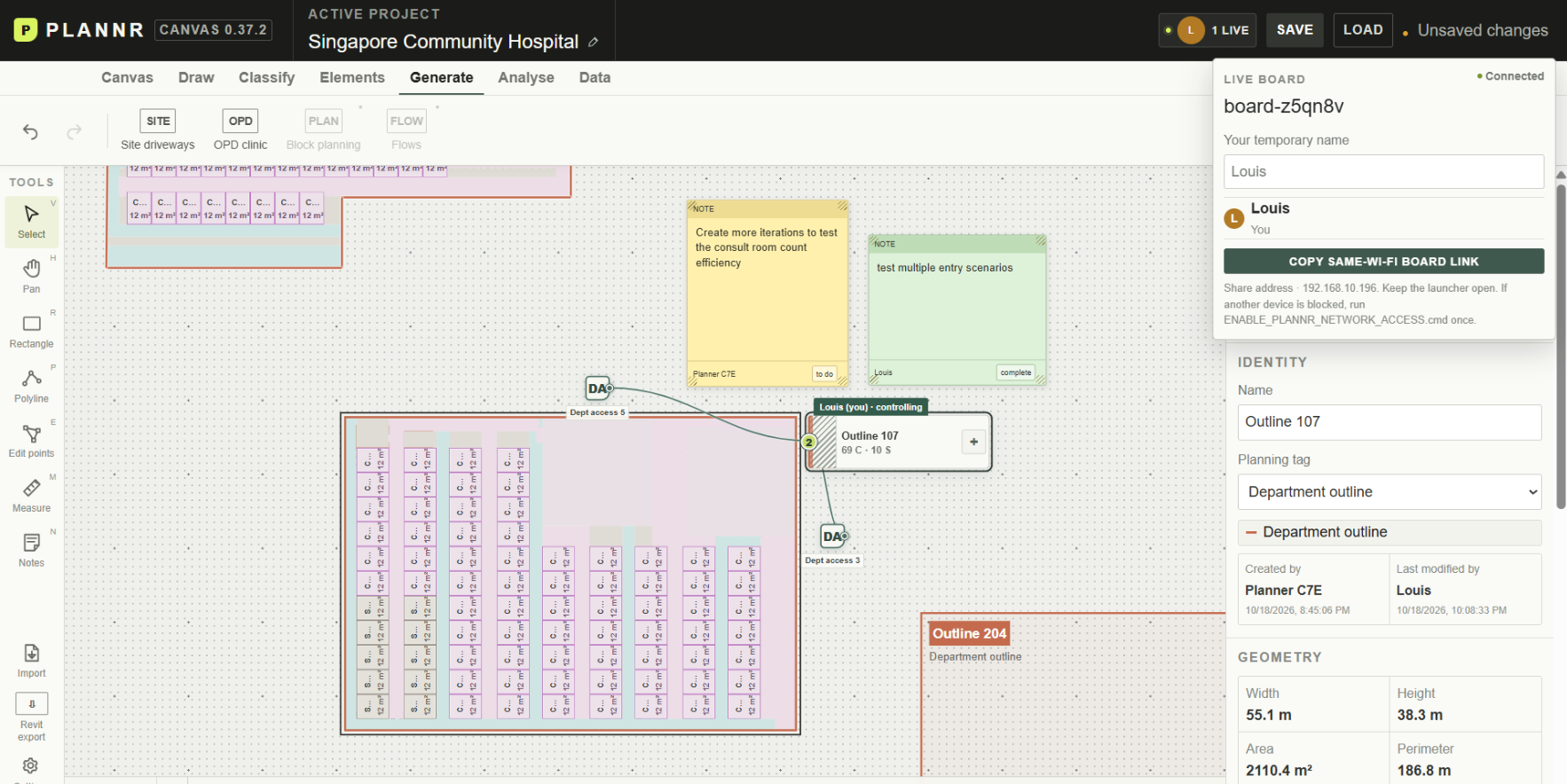
Alongside the exchange tools, the local shared canvas now has notes with authors and statuses: to do, in progress, complete or cancelled. In the screenshot, one note asks for more iterations to test the room count; another marks the entry-scenario test complete. That is a small addition, but it helps keep the next action beside the option it concerns. Shared previews and visible control of the active layout give people more context about what is being worked on. This is still the local-network collaboration setup, rather than a claim that every feature is available in the hosted beta.
For me, these two pieces belong together. Moving geometry between applications helps the design continue. Leaving a question, a name and a status on the canvas helps someone else continue the thinking. I want PLANNR to make both easier, so a department layout can move towards documentation without leaving the conversation behind.