
In the first PLANNR note, I asked whether a shared canvas could bring drawing, parametric testing and collaboration closer together. To start building it, I needed a smaller question: what does a shape on the canvas need to know?
If I draw a department outline, I know what it represents. The generator doesn't. It needs to know which boundary to use, where the entrance is and what kind of layout I am asking it to produce. That gap between a drawing and something a tool can work with became the first experiment.
Giving a shape some meaning
I started treating each outline as an object with its own identity. It still has points, edges and an area, but it can also have a name, a planning role and links to other things. Moving a corner shouldn't make it forget that it is the same department.
“Object-oriented” sounds more complicated than the idea needs to be. In practice, I want to change the shape without losing its information, or change its requirements without having to redraw it. If an entrance is connected to a department, that connection should survive an edit.
That becomes useful when there are several similar shapes on the board. A link needs to refer to a particular outline, rather than whichever shape happens to be closest. The same applies when a collaborator selects an object or a generator returns a set of rooms. We need to know what belongs to what.
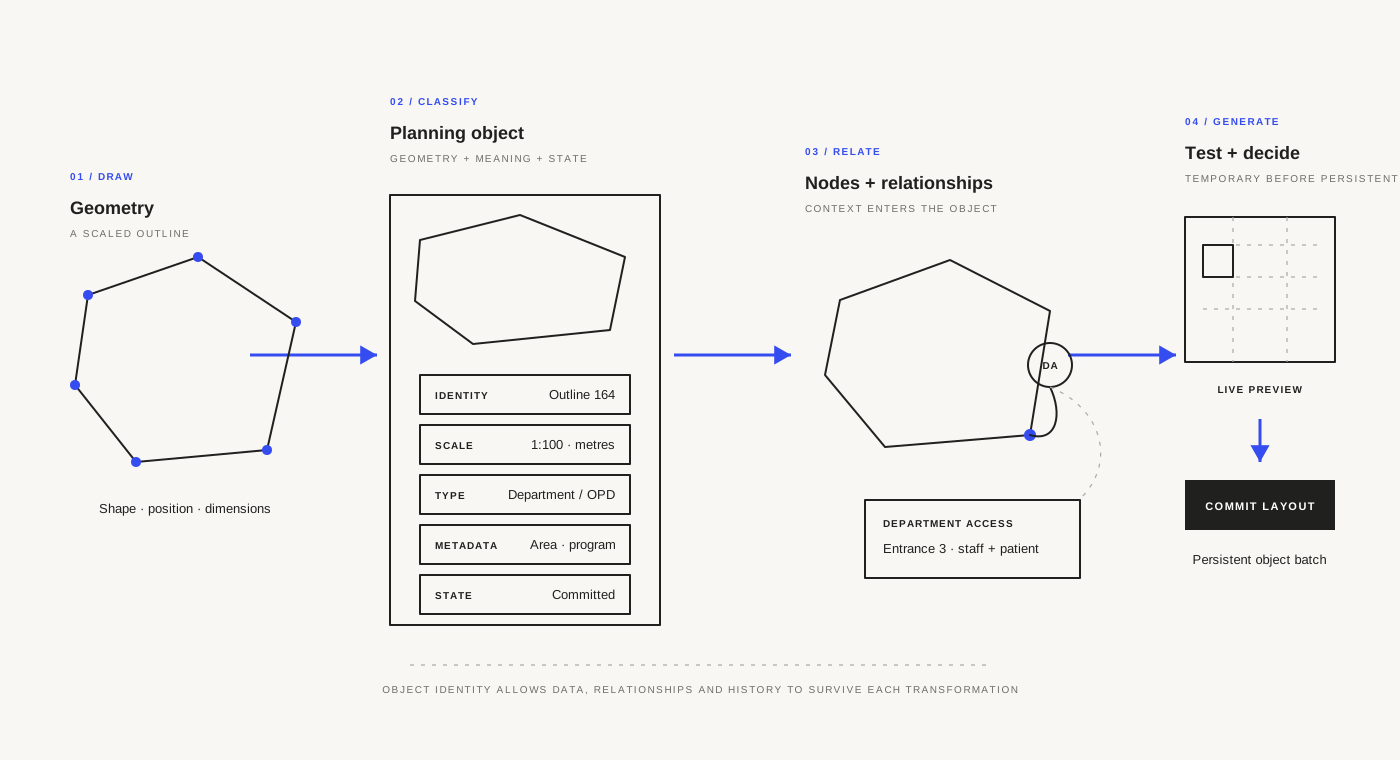
There is a human side to this too. The architect might be looking at the frontage, while someone else is checking the area or room mix. Keeping those things attached to the same outline gives us a common reference. We can discuss different concerns without constantly translating between a drawing and a separate schedule.
An entrance you can move
The department access node was an early test of that idea. It gives the entrance a visible position and a link to the outline it serves. I can move it and see how the layout responds, rather than type a value into a panel and try to imagine where that puts the entrance.
The connection line matters. A marker placed near a department doesn't necessarily belong to it. Drawing the link makes that assumption explicit. If the wrong node is connected, there is something visible to correct.
It also makes a planning question easy to try. What if we enter from the other side? What if two departments share an access point? The node gives us a way to ask those questions on the canvas, with the surrounding plan still in view.
I want to extend this approach to other relationships over time. For this first test, access was enough. It gave the generator a useful piece of context and gave us something we could change without starting the drawing again.
Starting with an outpatient department
The outpatient generator offered a manageable place to begin. Consultation rooms repeat, which makes it easier to see what a rule is doing. But the plan still has to deal with waiting, support rooms, patient and staff movement, entrances and the available boundary. Filling a shape with rectangles isn't enough.
The outline supplies the space. The access node tells the generator where the approach is. The controls let me try different room mixes, corridor widths and planning models, including shared and separate patient and staff corridors. Together, those inputs begin to describe a planning problem.
The result comes back as rooms and circulation with measurable areas, rather than a flat image. I can inspect the room count and see how much space is going into each part of the plan. That gives me something more useful to question than whether the arrangement looks convincing.
This is still a test bed. It simplifies a lot of outpatient planning, and the first rules won't suit every department or boundary. I am using it to learn how the objects, nodes and generator should work together before trying to cover more of the hospital.
Try it before keeping it
The interaction I care about most is the pause between Preview and Commit. A preview lets me change an input and look at the result without immediately making it part of the persistent canvas geometry. I can keep adjusting it or decide to leave it behind.
That feels familiar from Grasshopper. Move a slider, watch the result and decide whether it is worth pursuing. The difference here is that the controls and the generated option sit in the same planning canvas as the other department outlines and access relationships.
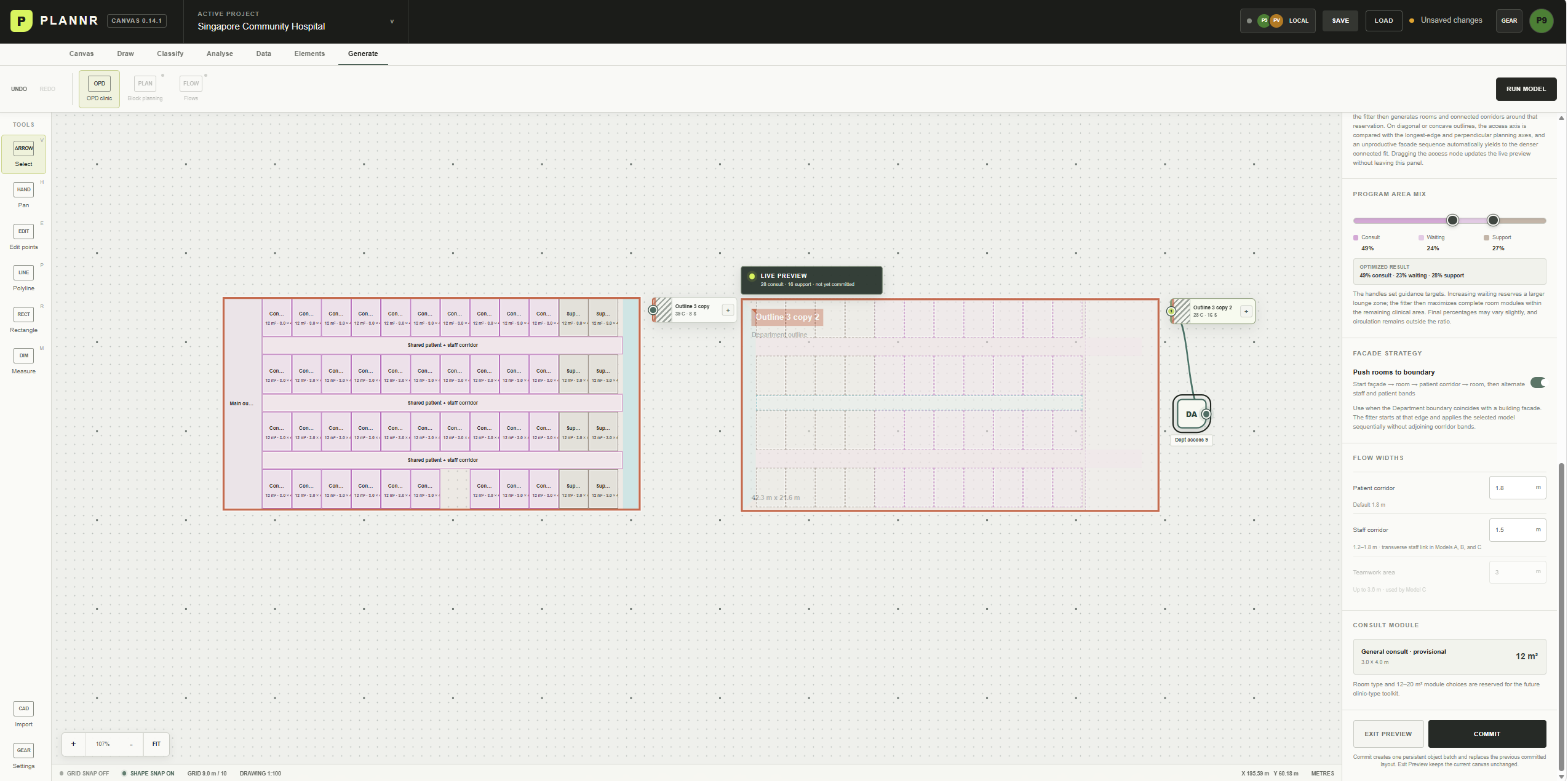
In this example, one layout is committed while another remains in preview. Keeping both visible makes it easier to compare the room arrangement, waiting space and circulation. Someone can point to a particular part of the plan and suggest a change. We don't have to agree on the whole layout before testing the suggestion.
A parameter is still a choice we have made. A 1.8-metre corridor or a particular consultation-to-waiting ratio can look authoritative in a control panel, but those values need discussion. More waiting space may mean fewer rooms. A wider corridor may leave a strip that the room modules can't use well.
I want the preview to make those consequences clear. Sometimes the useful result is an awkward layout, because it shows us that an assumption needs to change. Getting a higher room count isn't much of an achievement if the approach or waiting arrangement makes less sense.
When an option is useful enough to carry forward, Commit turns the preview into persistent objects. It is separate from saving the project. It also doesn't mean that the design is finished. It means we have something stable to work with for now.
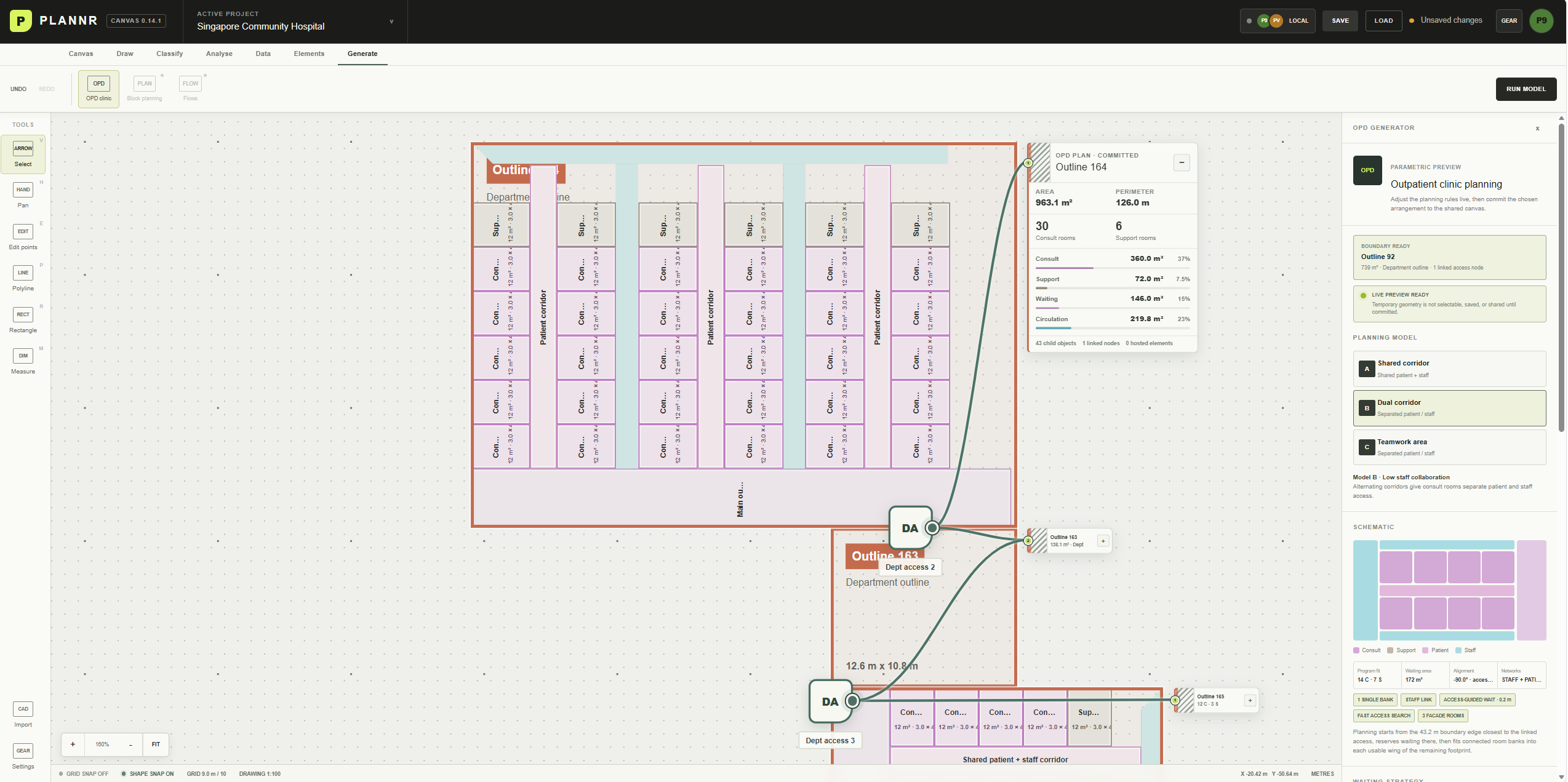
The expanded information in this screenshot keeps the areas and room counts beside the generated plan. The access nodes remain visible too. I can read the result and the conditions that helped produce it without opening another drawing or trying to remember which inputs I used.
What this makes possible next
Giving objects identities also helps with collaboration. An update can refer to a particular outline or node. One person can work on an access point while another looks at a different part of the board. The first local-network version adds temporary identities, cursors and shared selections to explore that way of working.
There is still a gap between seeing each other on a canvas and understanding each other's decisions. At this stage, the shared board is local and held in memory. The launcher needs to stay running, and it doesn't yet give us a complete record of authorship, discussion and parameter history. Those are things to develop, not things I want to imply are already solved.
The same clarity will matter if generative agents become part of the workflow. A tool should work from identifiable boundaries, nodes and requirements. When its output is unhelpful, we should be able to look at those inputs and understand what to change.
What feels promising so far is the continuity. I can draw an outline, give it a role, connect an entrance and test a layout without leaving the canvas. The result stays close to the question that produced it, which makes it easier to discuss.
The longer-term aim reaches beyond outpatient departments. I'd like to work from a site masterplan down to departments, rooms and the elements inside them. Each scale will need different knowledge and rules. This first experiment is about finding a way to carry that information with the geometry, so the next round of work has somewhere to begin.